
KiwiData Security Notice: Beware of Fake “Webmail Update Required” Emails
- Thursday, 11th June, 2026
- 12:57pm
This Is Not About One Company. This Is About Every Hosting Customer on the Internet.
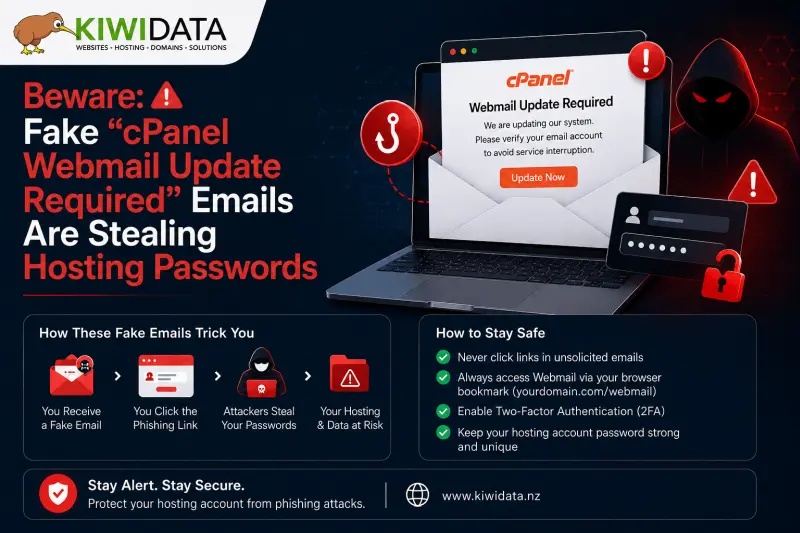
If you received an email telling you to "Update Webmail", "Verify your email address", or "Confirm your cPanel account to continue using email" — stop. Do not click anything. Read this first.
These emails are one of the most widespread phishing scams targeting web hosting customers globally in 2026. They do not discriminate by hosting provider. They target customers of every hosting company — large and small, local and international. Variations of these scams have circulated for years, and a new wave continues to target hosting customers across New Zealand and worldwide.
You did not receive this email because your hosting account is insecure. You received it because attackers harvest email addresses from every available source — domain registrations, website contact forms, public business listings, social media profiles, data breaches, and automated scanning tools. Every active email address on the internet is a potential target.
Important KiwiData Security Notice
KiwiData will never ask you to verify your email account, cPanel account, webmail account, or password by clicking a link in an unsolicited email.
If you receive an email claiming to be from KiwiData and you are unsure whether it is legitimate, do not click any links. Contact our support team directly through the KiwiData Client Area or by using the contact information published on our website.
Your knowledge is your strongest defence. Understanding exactly how these scams work, what to look for, and what to do when one arrives is the most effective protection available — more effective than any spam filter, more effective than any security software, and completely free.
This guide gives you everything you need to know.
What These Fake Emails Look Like
The "cPanel Webmail Update Required" phishing email is one of the most convincing scam emails targeting hosting customers because it uses real cPanel branding and mimics legitimate hosting notifications.
The email typically contains:
- From name displayed as: "cPanel", "Webmail Support", or sometimes your hosting provider's name
- Subject line such as:
- "Webmail Update Required"
- "Action Required: Verify Your Webmail Account"
- "Your cPanel Account Requires Verification"
-
Body text similar to:
"To continue using your email account, please verify that this is your email address."
- A prominent button labelled:
- "Update Webmail"
- "Verify Now"
- "Confirm Email Address"
-
A fake deadline:
"Authentication request expires on [date]"
- Logos, copyright notices, and references to cPanel designed to make the message appear legitimate
Everything about the email is designed to look routine — as if it is simply another system notification from your hosting control panel.
That is exactly what makes it dangerous.
What Actually Happens
Clicking the button takes you to a fake login page — often an almost perfect copy of the real cPanel or Webmail login screen.
The moment you enter your username and password, those credentials are sent directly to criminals.
Part 1: Why These Scams Are So Effective
They Exploit Routine
Hosting customers regularly receive genuine notifications about:
- SSL certificates
- Email accounts
- Hosting renewals
- Billing notices
- Backups
- Domain renewals
Attackers know this and design their emails to blend in with legitimate notifications.
They Create Artificial Urgency
Examples include:
- "Your account will be suspended."
- "You may lose access to your email."
- "Verification expires in 48 hours."
Fear causes people to act quickly without verifying the request.
Legitimate providers give reasonable notice periods and provide account-specific information.
Scammers rely on panic.
They Target Everyone
These attacks are not personal.
Attackers send millions of emails at once and wait for a percentage of recipients to click.
Email addresses are harvested from:
- Domain registration records
- Public website contact pages
- Social media profiles
- Business directories
- Previous data breaches
They Use Professional Branding
Modern phishing emails often contain:
- Official logos
- Professional layouts
- Correct spelling and grammar
- Authentic-looking signatures
Many are visually indistinguishable from legitimate emails.
Part 2: Eight Ways to Spot a Fake Hosting Email
1. Urgency Without Specific Details
Legitimate notifications contain information you can verify:
- Domain name
- Hosting account username
- Invoice number
- Actual expiry dates
Scammers typically use generic phrases such as:
- "Your account"
- "Your email service"
- "Authentication request"
If you cannot independently verify the claim, be suspicious.
2. The Email Wants You to Enter Your Password
This is the biggest warning sign.
No legitimate hosting provider will ask you to verify your identity by clicking a link in an email and entering your password.
If an email contains a button that leads to a login page, assume it is phishing until proven otherwise.
3. The Real Sender Does Not Match the Display Name
The sender name can say anything.
Examples:
- KiwiData
- cPanel
- Webmail Support
Always check the actual email address behind the sender.
A fake message may claim to be from KiwiData but actually originate from a completely unrelated domain.
4. Hover Over Links Before Clicking
On desktop:
Hover your mouse over the button or link.
On mobile:
Press and hold the link.
Check where it actually goes.
Look for:
- Misspelled domains
- Unfamiliar domains
- Domains containing words such as:
- secure
- verify
- update
- authentication
If the domain is unfamiliar, do not click.
5. Generic Greetings
Phishing emails often begin with:
- Dear Customer
- Dear User
- Dear Email Account Holder
Legitimate account notifications usually contain information specific to your account.
6. You Cannot Verify the Claim Independently
Every legitimate hosting issue can be checked directly by logging into your account.
For example:
- SSL status
- Email quotas
- Billing issues
- Domain expiry dates
If you cannot confirm the claim yourself, do not trust the email.
7. The Login Page Is Not Your Real Domain
Before entering credentials, check the address bar.
Typical legitimate access methods include:
- https://yourdomain.co.nz/cpanel
- https://yourdomain.co.nz:2083
- https://yourdomain.co.nz/webmail
- https://yourdomain.co.nz:2096
If the URL is different, stop immediately.
Remember:
A padlock alone does not prove legitimacy.
Many phishing sites use valid SSL certificates.
8. You Were Not Expecting Any Action
Ask yourself:
- Did I request a password reset?
- Did I submit a support ticket?
- Did I make a billing change?
If the answer is no, treat the email with caution.
Part 3: What Happens If You Click?
Stage 1 — Credential Theft
You enter your password.
The attacker immediately receives it.
Stage 2 — Email Account Access
Attackers log into your real mailbox and may:
- Read your emails
- Download your correspondence
- View invoices and business information
- Create forwarding rules
- Monitor future communications
Stage 3 — Account Takeover
Using password reset requests, attackers may attempt to access:
- Domain registrar accounts
- Hosting accounts
- Social media accounts
- Cloud storage services
- Business software platforms
- Financial services
In many cases, compromising one email account leads to multiple compromised services.
What To Do If You Receive One
- Do not click any links.
- Do not download attachments.
- Delete the email.
- Mark it as spam or phishing.
- Contact KiwiData if you are unsure.
What To Do If You Already Clicked
Act immediately.
- Change your email password.
- Change your KiwiData Client Area password.
- Enable Two-Factor Authentication (2FA).
- Review email forwarding rules.
- Change passwords on other services using the same password.
- Contact KiwiData support for assistance.
The faster you act, the less damage attackers can do.
Final Thoughts
Phishing attacks continue to evolve and become more convincing every year.
The good news is that nearly all phishing scams rely on the same tactic: convincing you to click a link and enter your password.
Remember these simple rules:
✅ Stop and think before clicking.
✅ Verify claims independently.
✅ Never trust login links in unsolicited emails.
✅ Use strong passwords and enable Two-Factor Authentication.
✅ Contact KiwiData if something doesn't look right.
When in doubt, do not click. Take a few minutes to verify first. Those few minutes can prevent days or weeks of disruption.
Stay safe online.

