
This guide explains how to use KiwiData name servers, manage your DNS records, use predefined Record Sets, manage DNSSEC, and change your domain's name servers.
KiwiData Name Servers
If your domain is using KiwiData DNS services, use the following name servers:
| Name Server | IP Address |
|---|---|
| ns1.kiwidata.nz | 163.47.130.147 |
| ns2.kiwidata.nz | 172.105.163.183 |
| ns3.kiwidata.nz | 103.51.100.7 |
Using KiwiData name servers allows you to manage your DNS records through the KiwiData Client Area and use our DNS management tools.
Managing Your DNS Records
If your domain uses KiwiData name servers, you can manage its DNS records directly from the KiwiData Client Area.
To access your DNS records:
- Log in to the KiwiData Client Area.
- Go to Domains → My Domains.
- Click On Green Active - Manage Here
- Select the domain you want to manage.
- Click DNS Zone
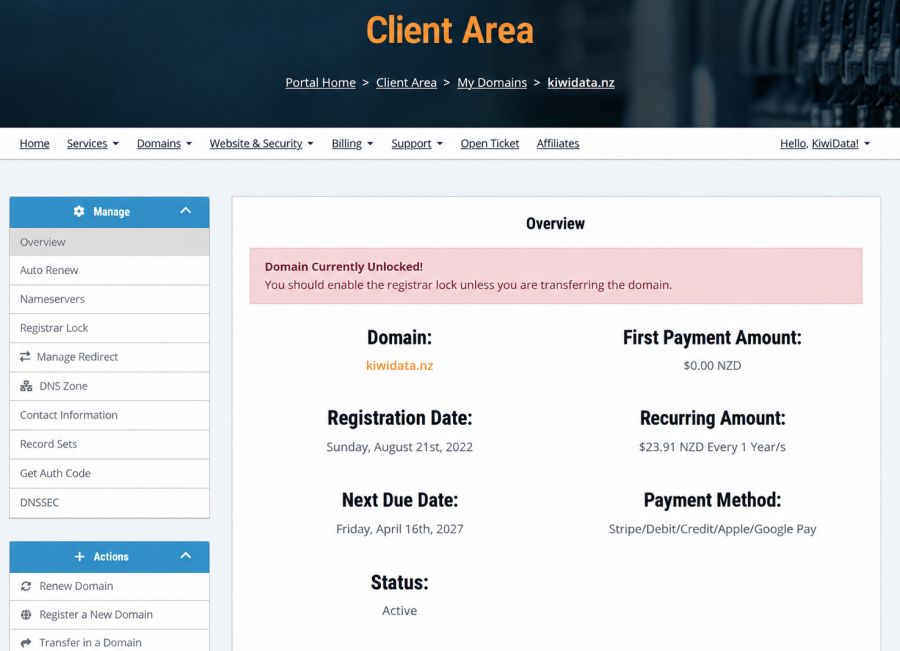
DNS Zone securely opens the DNS Zone Editor for your domain.
From here you can add, edit or remove DNS records including:
- A and AAAA records
- CNAME records
- MX records
- TXT records
- SPF and verification records
- SRV records
Important
Be careful when changing existing DNS records.
Incorrect DNS settings can interrupt your website, email or other services associated with the domain. If you are unsure about a DNS change, please contact KiwiData Support before making it.
Record Sets
Record Sets can only be used when your domain is using KiwiData name servers and KiwiData DNS services.
Your domain must be using:
- ns1.kiwidata.nz
- ns2.kiwidata.nz
- ns3.kiwidata.nz
From your domain management page, select Record Sets to access predefined DNS configurations for supported services.
Record Sets make it easier to configure services such as:
- Microsoft 365
- Google Workspace
- Wix
- Other supported third-party services
Instead of manually entering every DNS record, you can use the appropriate Record Set as a starting point for configuring the service.
If You Use External Name Servers
If your domain uses name servers belonging to another provider, KiwiData Record Sets cannot make changes to those external DNS servers.
You will need to add the required DNS records directly through your external DNS provider.
Alternatively, you can change the domain to use KiwiData name servers and manage the DNS through KiwiData.
Important: Do not change your name servers simply to use a Record Set without first checking your existing DNS configuration.
Updated 15.9.2026
Any existing website, email and other required DNS records must be recreated on the KiwiData DNS service before or as part of the change. Otherwise, your services may stop working.
DNSSEC
KiwiData provides DNSSEC management for supported .nz domains through our direct connection to the InternetNZ registry.
To manage DNSSEC:
- Log in to the KiwiData Client Area.
- Go to Domains → My Domains.
- Select the domain.
- Select DNSSEC from the Manage menu.
The DNSSEC page allows you to manage the DS records published for your domain at the .nz registry.
Before Enabling DNSSEC
DNSSEC must first be correctly configured by the DNS provider hosting your authoritative DNS zone.
Your DNS provider will normally provide the DS information required, including:
- Key Tag
- Algorithm
- Digest Type
- Digest
These details can then be entered into the KiwiData DNSSEC page.
Important — Disabling DNSSEC
If you need to disable DNSSEC, remove the DS records from the KiwiData DNSSEC page before disabling DNSSEC at your DNS provider.
Do not disable DNSSEC signing at your DNS provider while DS records are still published at the registry.
Doing this can cause DNS validation failures and may make your website, email and other services unreachable until the DNSSEC configuration is corrected.
Using KiwiData DNS With Other Service Providers
You don't necessarily need to change your domain's name servers when using services from another provider.
For example, if you are setting up:
- Microsoft 365
- Google Workspace
- Wix
- An external website hosting company
- An email provider
- Another cloud service
you may be able to keep your KiwiData name servers and simply add the DNS records supplied by that provider.
You can enter those records through DNS Zone, or use Record Sets when KiwiData has a predefined configuration available for that service.
This allows KiwiData to continue managing your authoritative DNS while your website, email or other services are hosted elsewhere.
Changing to External Name Servers
Some providers may require you to use their own name servers.
If you need to change your domain's name servers:
- Log in to the KiwiData Client Area.
- Go to Domains → My Domains.
- Select the domain you want to manage.
- Select Nameservers from the Manage menu.
- Enter the name servers supplied by your new provider.
- Save your changes.
Once your domain is using external name servers, DNS records must normally be managed through that provider rather than through KiwiData's DNS Zone or Record Sets.
Before Changing Name Servers
Changing name servers changes which DNS service is authoritative for your domain.
Before making the change, make sure the new DNS provider has all the records required for your services.
These may include:
- Website A/AAAA records
- CNAME records
- MX email records
- SPF records
- DKIM records
- DMARC records
- Autodiscover records
- Domain verification TXT records
- SRV records
- Other application-specific records
Missing records can cause websites, email and other services to stop working.
DNS Changes and Propagation
DNS and name server changes are not always visible everywhere immediately.
Different internet providers and DNS resolvers may cache previous information, so changes can take time to propagate.
During this period, some users may see the new DNS information while others may temporarily continue to receive cached information.
Which Option Should I Use?
For most KiwiData customers:
DNS Zone — Use this when you want to manually view, add, edit or remove individual DNS records.
Record Sets — Use this when your domain uses KiwiData name servers and you want to configure predefined records for services such as Microsoft 365, Google Workspace or Wix.
DNSSEC — Use this to manage the DS records for DNSSEC on supported .nz domains.
Nameservers — Use this when you need to change which company/provider hosts the authoritative DNS for your domain.
Need Help?
DNS changes can affect multiple services associated with your domain.
If you are moving your website, changing email providers, configuring Microsoft 365 or Google Workspace, changing name servers, or enabling DNSSEC and are unsure which records you need, please contact KiwiData Support before making the changes.
We can help you identify the required DNS configuration and reduce the risk of interruption to your services.

